Move a web table into your spreadsheet.
TableSnag exports supported tables and loaded grid rows to CSV, Excel, JSON or Markdown. Preview the rows and columns before downloading.
Install free from Chrome Web Store
Version 1.0.5 is free. A paid version is not available yet; there is no checkout or upgrade button.
How to use it
- Open a web page with a table you want to save.
- Click the Extensions button in Chrome, then TableSnag. Pin it if you want its button to stay visible.
- Choose a table from “Tables on this page” and check the preview and any warning.
- Click “Download CSV” or “Download Excel”. For a quick paste, click “Copy for Excel / Sheets”.
It can save rows the page has loaded, not hidden rows a site has not loaded. What to try if no table appears.
Try it on this page
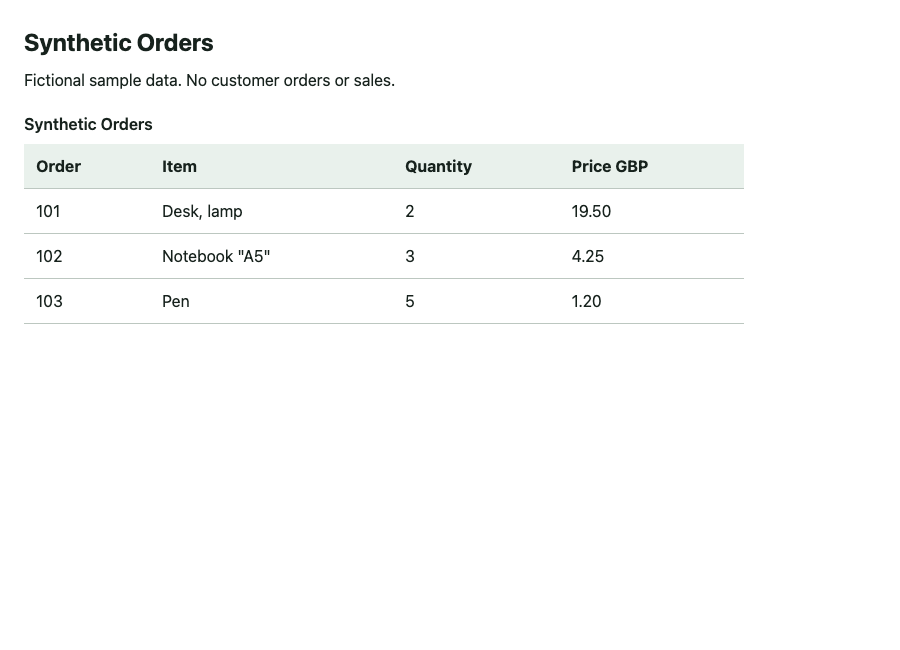
After installing TableSnag, open it while you are on this page. Choose “Sample orders”, check the preview, then download the CSV. No account or payment is needed.
| Order | Item | Quantity | Price GBP |
|---|---|---|---|
| 101 | Desk, lamp | 2 | 19.50 |
| 102 | Notebook "A5" | 3 | 4.25 |
| 103 | Pen | 5 | 1.20 |
These are fictional orders. The separate CSV below shows the output of a local module test; the installed extension has not been tested on this live page.
A table with commas and quotes
In this fictional three-row orders table, the comma in Desk, lamp and quotes in Notebook "A5" must stay inside their spreadsheet cells. The CSV on the right is the actual output from a local test of the reviewed 1.0.5 detection and export modules.
Order,Item,Quantity,Price GBP
101,"Desk, lamp",2,19.50
102,"Notebook ""A5""",3,4.25
103,Pen,5,1.20
Why this one exists
TableSnag has no extension-imposed row cap. If the page has loaded five thousand rows, TableSnag can export those rows. Excel has its own sheet limit; use CSV for larger tables.
What it reads
Real HTML tables
Merged cells included — a cell spanning three rows comes out as that value in all three, which is what a spreadsheet actually needs.
Grids that aren't tables
React, AG-Grid and the rest build tables out of divs. TableSnag spots the repeated structure and reads it anyway.
Accessibility grids
Anything marked up as role="table" or
role="grid".
Split tables
Sports standings and financial screeners often render the row labels as a separate table beside the numbers. Those get stitched back together.
What it exports is what the page has loaded
Some grids keep only the rows currently on screen and fetch more as you scroll. TableSnag reads the page; it does not scroll for you. On a grid like that you get the rows that are loaded. Where the grid states its real total, the popup tells you how many of how many you are getting — and where it does not state one, TableSnag cannot tell. Scrolling is not a complete-export fix for a virtualised grid; use that site's own export when you need every row.
It survives Excel
Every cell is checked before it is written, because the usual complaint about exported data is not that it is missing — it is that it arrives mangled.
- Both thousands conventions. 1,234.50 and 1.234,50 are the same number.
- Currency symbols are kept with the value in CSV, TSV and Markdown. Excel retains the currency in the cell format.
- Accounting negatives. (1,234.00) is minus 1,234, not text.
- Leading zeros survive. Product code 00417 stays 00417.
- Dates become real dates in Excel and ISO dates in JSON. CSV, TSV and Markdown use YYYY-MM-DD for recognised dates. Where a date is genuinely ambiguous, the extension tells you before you export.
- Formula injection neutralised, so opening the file cannot run something a web page put in a cell.
Your tables never leave your browser
TableSnag processes rendered table content locally after you invoke it. There is no account, analytics or licence request.
Free now; paid version coming soon
CSV, TSV, Markdown, Excel and JSON; batch workbooks; column selection, reordering and renaming; saved export setups. No key or payment. No extension-imposed row cap.
A paid version may follow, but no paid features or price are being offered yet.
Upgrading clears the old licence record and its customer email while keeping saved setups. If storage is unavailable, the popup reports this and retries next time.
Live on the Chrome Web Store. Other browsers have not been tested.